Limiting local 9 attack in WordPress
Dienstag, 27. Mai 2014
Until now, the one shell to the host then defacements to the database in order to appropriate the entire website as an administrator in the form of the most common attacks on all source code, WordPress is no exception.
The mission of the attacks on the local attack targets security on server inferior to gain control over other websites on the same system. Therefore, when using share host, you will be vulnerable to attack than use local private server or virtual server, but if you have many websites that are not able to control whether the server is local, is always attack.
Typically, the steps taken in the process of local hack (or Local Attack) includes:
- Detect user in server.
- Detect and read config file content (in WordPress wp-config.php it is).
- Get login information into the database.
- Attack admin account.
- Finally, the shell up.
I do not have to be a specialist in hacking so its variants may be different with each person's skills, but most generally are.
Thus, one of the common ways that hackers will take more time to attack it is thoroughly security config file. And in this article, I will guide you with some tips for securing wp-config.php file in WordPress to limit local attack.
1. Hiding file wp-config.php
Although there are a few shell as Coleil can detect whether the config file of the source code where you can hide files but the take-sensitive techniques will also help you somewhat limited, at least in the hacker "practice".
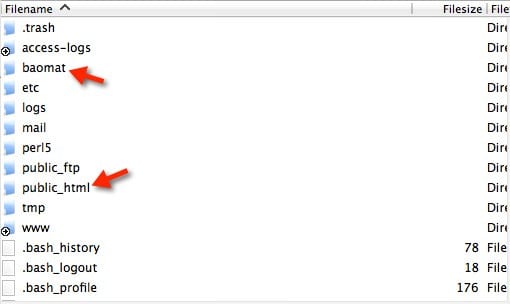
In the linux host, usually the files on your site are in the public_html directory path and generally will be /home/username/public_html/wp-config.php .
Therefore, the best way is to hide the config file you should put your wp-config.php file from the public_html folder, you can log in to the host via FTP and create a folder name is on a par with any of public_html.

Create peer public_html directory
Then upload your wp-config.php file in the public_html folder and upload it to the newly created folder. Finally, edit the wp-config.php file in the public_html directory as follows:
<Php nếu define ('ABSPATH, dirname (__FILE__)' / '.) (Được định nghĩa (' ABSPATH ')); require_once (ABSPATH '/ baomat / wp-config.php...);
You replace the baomat the name of your folder that you created it on par with public_html.
Note: This only applies to the website immediately install files in the public_html folder, not a layer supports other folder. You can apply to the www folder, if any.
2. Changing the database prefix
Database prefix (prefix database) will be the default WordPress wp_, this inadvertently makes the hacker knows the name of each table of your website if you do not change this prefix go.
How many ways can change the prefix, but it is better to use the plugin WP Better Security for change, remember to backup all data before doing okay although I did so many times without error.
3. Changing security key
You try to open the file wp-config.php, pull down and see a piece of content like this?
  define ('AUTH_KEY', 'jpwfcb9izge9gnz9unoakwpovdtn754sekxebbs5zvdzgl187lftu51o6qucv6py');
 define ('SECURE_AUTH_KEY', 'lqodqrrfksxmn8qsy6i3kwshu7su1czmnt6xj6wtpx54er9c5dmweqptupwzzfpa');
 define ('LOGGED_IN_KEY', 'pxo6nd6mnfw04m3u0m38layynhrh7atesuqgonitzf0xxnqxyydqpfurqr3znsoi');
 define ('NONCE_KEY', 'bhlrnqwfoxfzhpcyhyqlo8jh7vhdh3ov4swgsmygwvfzx8q65hmilhwt4iylgkd8');
 define ('AUTH_SALT', 'prfbyplbizqiqu1i42hm622ovsznaoayr9abxcbz15xks54nnkhguzqhwkndzy6v');
 define ('SECURE_AUTH_SALT', 'erjzw2objjfmachy7vt9mq2ktufh2331ypnuaeanjl1oegorjrngvzvcrftnywkd');
 define ('LOGGED_IN_SALT', 'kpvryyyj1zwznarx4l8lloigurf9mqetnlojnxtygjhuqtj9acq4lpr5jsm2kyjg');
 define ('NONCE_SALT', 'arimerdvr8fbw7pkigotdb7psvc2ysa7bqrnunrzwbcqlkqhs6xzokhzwnrmsg3a');
Above is the random string save each user's session when logging into the admin panel. Make sure you enter random characters on the key.
It should be noted that, if your website has been hacked, then this should also return key a few times a week to make sure.
4. Prohibition theme and plugin in the edit panel
There are some pretty sophisticated hacker is after entering your website they will be inserting some code that scattered inside the theme / plugin that you are using.
Therefore, consider using Editor feature in the admin panel, it is best to turn it off if you're not used to, turning off is inserted into any line in wp-config.php file
1
|
define ( 'DISALLOW_FILE_EDIT' , true);
|
5. Prohibition install a theme / plugin
There was no exception in case the hacker can install a plugin or theme that the party in which all contain malicious code if they have access to the control panel. Therefore, if you do not wish toinstall the theme theme / plugin, please put the following in your wp-config.php file
1
|
define ( 'DISALLOW_FILE_MODS' , true);
|
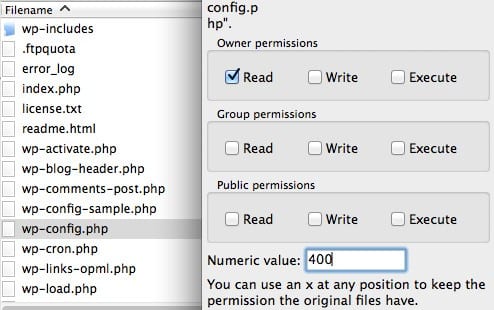
6. CHMOD file wp-config.php

CHMOD file to wp-config.php
By default, the file will be in WordPress folder is CHMOD 644 and 755. However wp-config.php file for you should CHMOD than optimal, you can replace the 440, 444 or 400. 400 Try ago , the test is not 444.
7. Blocking executable file wp-config.php
This is a tip if you do not like anyone touching wp-config.php file on the host.
For the nginx server after stage inserted into the config file
  location ~ * wp-config.php {
 deny all;
 }
As for the Apache server after stage inserted into the file. Htaccess
  <Files Wp-config.php>
     order allow, deny
     deny from all
     </ Files>
8. Course wp-admin path
Of course wp-admin folder and wp-login.php file is always attacked if someone wants to access your website. Therefore, it is better to stop all visits to these areas, except you out.
To do this you can use the features in Incapsula Protect Login or create a file. htaccess in wp-admin folder and insert the following.
  <FilesMatch ".*">
 Order Deny, Allow
 Deny from all
 Allow from 123,456,789
 </ FilesMatch>
Replace the IP number of your computer 123,456,789, want to know is what is your IP here .
For Nginx then insert this into the config file.
  location ~ ^ / (wp-admin | wp-login \. php) {
                 allow 123,456,789;
                 deny all;
   }
9. Plugin Use the malware scan
This step can tell you good luck on your host containing the file to which you can delete it or download .... soaked paper. Here are the best plugins for you to scan malicious code on the host totally free that you can use:
and if you have the money, I encourage you to use Sucuri Premium (only $ 90/nam) to find and wipe out all the malware itself.
Epilogue
The local victims protect themselves against attack not only on the way in but I think if you do all the steps it will limit somewhat the ability to be attacked through this form.
In addition, there is a very important note to hack limited local use shared hosting which is reputed and fast support, shared a list of reputable host that you can see here .

 Kiến thức mạng
» Điện thoại
» Mã nguồn
» News
» Website
» Wordpress
» Limiting local 9 attack in WordPress
Kiến thức mạng
» Điện thoại
» Mã nguồn
» News
» Website
» Wordpress
» Limiting local 9 attack in WordPress


All comments [ 0 ]
Your comments